Stopping product with a moving part

A model is only a picture to the physics. Boxes on a conveyor bump into a part's colliders, the hidden boxes that give it a solid shape. A piece that moves needs a collider that moves with it.

In this guide the blade of your blade stop gets a collider of its own. A box rides the conveyor, a photo eye sees it arrive at the blade, and the program holds it for 3 seconds before it lets it go. It takes about ten minutes.

You need

1. Give the blade a collider

The part's only collider is the box around the whole model. It stays where it is when the blade rises, so a box on the rollers would go straight through the raised blade.

  1. Right-click Blade Stop 900 and choose Open Part Editor.
  2. Click Blade in the Scene dock.
  3. Near the bottom of the Inspector, set New node to box and click Add child node. A box node appears under Blade, selected.
  4. Double-click its name in the Scene dock, type bladeCollider and press Enter.
  5. Type these into the Inspector, pressing Enter after each:
FieldSet toMeaning
Offset0.047, 0.071, 0X, Y and Z of its centre, measured from the model's origin, where the blade's own pieces are measured from.
Box size0.025, 0.08, 0.96As thick as the blade and a little more, the top 8 cm of it, and as wide as the lane.

Then click the eye beside bladeCollider in the Scene dock to hide it. Like collider, it stays solid while it is hidden.

Its top is the blade's top edge. Lowered, it sits under the rollers with the blade, out of the boxes' way. Raised by the joint's 6 cm, it stands 5 cm above the rollers, in their way. It is under Blade, so the joint moves it with the blade.

The Scene dock in the Part Editor: Blade Stop 900, body, Blade, the hidden bladeCollider under Blade, and collider.
The blade's own collider, under the blade.

2. Add a box and a photo eye

Click ‹ Scene, then:

  1. From the Products tab of the Parts dock, drag a Box into the view.
  2. From the Devices tab, drag a Photo Eye into the view.
  3. Select each one and type these into the Inspector. Presence Tag is in the Comms group.
PartFieldType inMeaning
BoxPosition-1.5, 1, 0On the rollers, upstream of the blade. A box's position is its centre: the rollers' 0.8 plus half its 0.4 height.
Photo EyePosition0.15, 0.78, 0.56On the conveyor's side, just before the blade, where a held box stands.
Photo EyeRotation0, 180, 0Facing across the conveyor.
Photo EyePresence TagBoxAtStopTrue while it sees a box.

The conveyor carries boxes toward +X, toward the blade stop at 0.5. The box is 0.6 m long, so held against the blade its centre stands at about 0.15, in the photo eye's beam.

3. Write the program

Open the PLC tab and replace the program with this one:

PROGRAM Main
VAR
  RaiseBlade : BOOL;
  BladeUp : BOOL;
  BladeDown : BOOL;
  BoxAtStop : BOOL;
  Release : BOOL;
  Hold : TON;
  Clear : TON;
END_VAR

Hold(IN := BoxAtStop AND BladeUp, PT := T#3s);
IF Hold.Q THEN
  Release := TRUE;
END_IF;

Clear(IN := Release AND BladeDown AND NOT BoxAtStop, PT := T#1s);
IF Clear.Q THEN
  Release := FALSE;
END_IF;

RaiseBlade := NOT Release;
END_PROGRAM

The blade is up unless the program is releasing a box. Hold counts 3 seconds from the photo eye seeing a box while the blade is up, then Release lowers it. Clear waits until the blade is down and the box has left the eye, gives it 1 second more to clear the blade, and raises the blade for the next box.

4. Run it

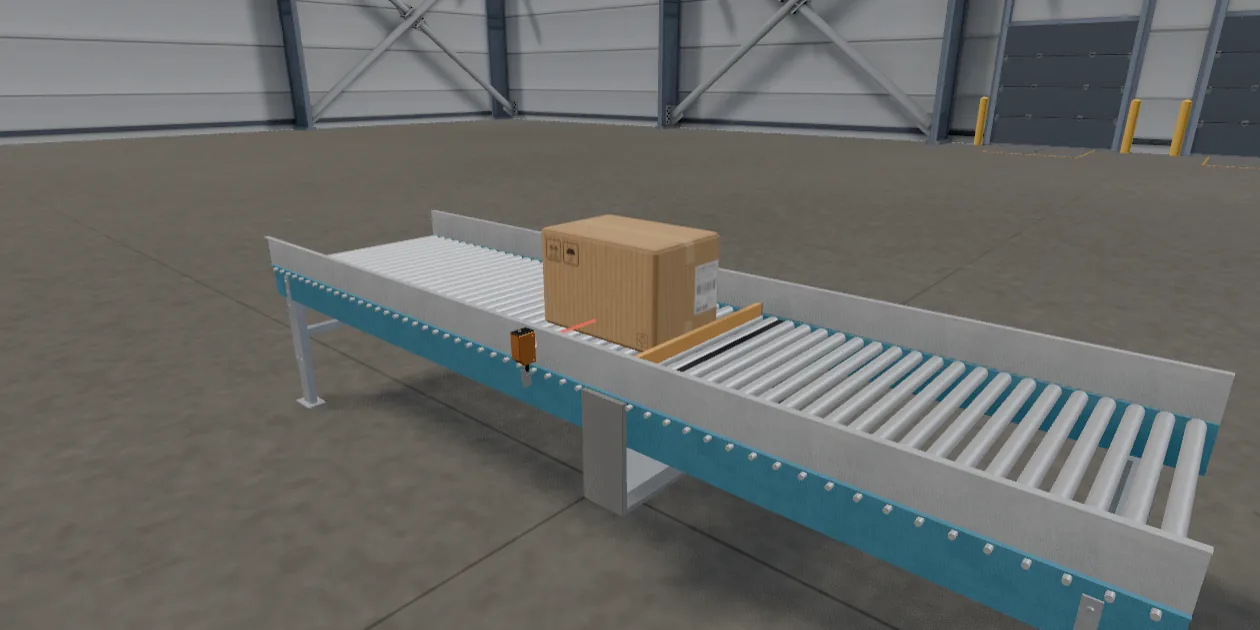
Press Play. The box rides the rollers to the blade and stops against it. The photo eye's beam turns red on the box. 3 seconds after the beam first caught it, the blade sinks and the box rides on over it, and 1 second after the box has left the beam, the blade rises again.

A box on the roller conveyor, held against the raised orange blade, with the photo eye's beam across the conveyor on the box.
A box held at the blade stop, seen by the photo eye.

You have built a working part from a model: it moves on a PLC command, reports where it is, and stops product. Compare it with the built-in Blade Stop in the Equipment tab, which does the same in code, and read the part authoring reference for what a behavior script adds.

Troubleshooting

The box goes through the raised blade.
bladeCollider is not under Blade, so it does not rise. Select it and set its Parent to Blade in the Inspector.
The box stops while the blade is down, or tips over it.
The collider reaches above the rollers at rest. Check its Offset Y is 0.071 and its Box size Y is 0.08.
The box never stops: BoxAtStop stays false.
The photo eye faces away from the conveyor, or its Presence Tag is spelled differently from the program. Check its Rotation is 0, 180, 0.
The blade goes up and down on its own, every 2 seconds.
The program is still the one from the last guide. Replace it with the one in step 3.
The box falls off the end.
The conveyor ends at X = 2, and nothing is past it. Make the conveyor longer, or add another one after it.